AIMS DARE TO SUCCESS MADE IN INDIA

Saturday, 6 January 2018

Computer Keyboard Shortcut Keys

Keyboard Shortcut Keys

Never Again Forget These 30 Keyboard Shortucts :-
Ctrl + C – Copy the selected text or object.
Ctrl + V  – Paste the selected text or object.
Ctrl + X   – Cut the selected text or object.
Ctrl + Z – Undo the last action.
Ctrl + Y  – Redo the last action.
Ctrl + G – Go to particular page.
Ctrl + S – Save the file.
Ctrl + W – Close window or tab.
Ctrl + N – New Window.
Ctrl + A  – Select all.
Ctrl + P – Print the current page.
Ctrl + O – Open a document.
Ctrl + ESC – Open start menu.
Ctrl + Tab – Used to switch between tabs in a program.
Ctrl + Home – Move the cursor to the beginning of the document.
Ctrl + End – Move the cursor to the end of a document.
Ctrl + Backspace – Delete a full word at a time instead of single character.
Ctrl + Right Arrow – Move the insertion point to the beginning of the next word.
Ctrl + Left Arrow – Move the insertion point to the beginning of the previous word.
Ctrl + Down Arrow – Move the insertion point to the beginning of the next paragraph.
Ctrl + Up Arrow – Move the insertion point to the beginning of the previous paragraph.
Shortcuts Using Shift Key:
Shift + Delete – Used to delete selected file or document permanently.

Shortcut Keys Using Window Key:
Win – Open or close start menu.
Win + D – Display the Desktop.
Win + M – Minimize all Windows.
Shift + Win + M – Undo minimize all.
Win + E – Open my computer.
Win + F – Find or Search box.
Win + L – Lock the keyboard.
Win + R – Open Run at startup menu.

20 Shortcut Keys for Microsoft Word:-
Shortcut Keys Using Ctrl Key:
Ctrl + B – Used to bold the selected text.
Ctrl + I – Used to italicize the selected text.
Ctrl + U – Used to underline the selected text.
Ctrl + E – Align the line or selected text to the centre of the screen.
Ctrl +Shift + F12 – Prints the document.
Ctrl + Shift + F6 – Switches to another open Microsoft Word document.
Ctrl + Shift + F – Will activate the Font option and you can select the required font.
Ctrl + Shift + < – Decrease the font size one value.
Ctrl + Shift + > – Increase the font size one value.
Ctrl + Enter – Insert Page break.
Ctrl + K – To insert a hyperlink.
Ctrl + ‘=’ – for subscript. (First select a text, then press Ctrl + ‘=’)
Ctrl + Shift + ‘+’ – for superscript. (First select a text, then press Ctrl + Shift + ‘+’)
Shortcut Keys Using Ctrl + Function Key
Ctrl + F2 – Display the print preview command.
Ctrl + F4 – Close the window.
Ctrl + F6 – Go to the next window.
Ctrl + F10 – Maximise the document window.
Ctrl + F12 – Display the open command.
Home and End Key
Home – Moves the cursor position to the first character.
End – Moves the cursor position to the last character.

25 Shortcuts for Microsoft Excel
Shortcut Keys Using Ctrl key:
Ctrl + A –    Select all contents of the worksheet.
Ctrl + B –    Bold highlighted selection.
Ctrl + I –    Italic highlighted selection.
Ctrl + U –    Underline highlighted selection.
Ctrl + P –    Displays the print dialog box to begin printing.
Ctrl + Z –    Undo last action.
Ctrl + K –    Insert link.
Ctrl + 5 –    Strikethrough highlighted selection.
Ctrl + F3 –    Open Excel Name Manager.
Ctrl + F9 –    Minimise current workbook.
Ctrl + F10 –    Maximise currently selected workbook.
Ctrl + ‘ –    Insert the value of the above cell into cell currently selected.
Ctrl + Space –    Select entire column.
Ctrl + Shift + = – Insert a new column or row.
Ctrl + Home –    Move to cell A1.
Ctrl + Tab –    Move between two or more open Excel files.
Shortcut Keys Using Function key:
F2 –    Edit the selected cell.
F5 –    Go to a specific cell.
F7 –    Spell check selected text and/or document.
F11 –    Create chart from selected data.
Shortcut Keys Using Shift Key:
Shift + F3 –    Open the Excel formula window.
Shift + F5 –    Bring up search box.
Shift + Space –    Select entire row.
Shortcut Keys Using Alt key:
Alt + = –    Create a formula to sum all of the above cells.
Alt +Shift + F1 – Insert new worksheet.

Computer Input & Output Devices

Input & Output Devices

Keyboard – Keyboard is a primary input device that helps to input data. The standard keys are as follows.
Mouse – Mouse is a pointing device. The mouse can be used to control the position of the cursor.
Joystick – Joystick is also a pointing device that is used to move the cursor on the monitor. Few applications of the joystick include playing computer games, Computer Aided Designing (CAD), etc.
Light Pen – Light pen is a pointing device that looks like a pen. It is used to select a menu item, draw pictures, etc.
Track Ball – You will often find track ball in a notebook or a laptop computer. This device can be used instead of a mouse.
Scanner – You will use a scanner when you have to transfer information from paper to computer memory.
Digitizer – A digitizer converts analog information into digital form.
Microphone – Microphone is used to input sound. You can use this device for various applications like adding sound to a multimedia presentation, for mixing music, etc.
Magnetic Ink Card Reader (MICR) – MICR is used to read characters printed using special magnetic ink. (You will usually find this device in banks. Bank staff use MICR in check processing.)
Optical Character Reader (OCR) – OCR is used to read printed text. OCR scans text character by character, converts them into a machine readable code and stores the text in memory.
Bar Code Reader – You can use this device to interpret bar codes data. (You will often find this device in supermarkets.)
Optical Mark Reader (OMR) – OMR is used to read shades made by pen or pencil. (Exam boards, educational institutions, etc., often use this device for evaluation.)


List of 3 Output Devices

(These are the devices that give you data from the PC).
Monitor – Monitor is the most common output device of a computer. You can also call this Visual Display Unit (VDU).
Printer – Printer is used to print information on paper.
Plotter – You can use a plotter to print images in vector graphics format.


Computer File Extensions

File Extensions

.doc – Microsoft Word Document.
.docx – Microsoft Word Open XML Document.
.tex – LaTeX Source Document.
.mp3 – MP3 Audio File.
.wps – Microsoft Works Word Processor Document.
.txt – Plain Text File.
.odt – OpenDocument Text Document.
.dat – Data File.
.pps – PowerPoint Slide Show.
.ppt – PowerPoint Presentation.
.pptx – PowerPoint Open XML Presentation.
.flv – Flash Video File.
.avi – Audio Video Interleave File.
.tar – Consolidated Unix File Archive.
.xml – XML File.
.gif – Graphics Interchange Format File.
.xls – Excel Spreadsheet.
.dbf – Database File.
.sql – Structured Query Language Data File.
.exe – Windows Executable File.
.html – Hypertext Markup Language File.
.asp – Active Server Page.
.css – Cascading Style Sheet.
.tmp – Temporary File.
.bak – Backup File.
.aif – Audio Interchange File Format.
.aspx –    Active Server Page Extended File.
.bmp – Bitmap Image File.
.cgi – Common Gateway Interface Script.
.crx – Chrome Extension.
.fla – Adobe Flash Animation.
.iff – Interchange File Format.
.jar – Java Archive File.
.jpg – JPEG Image.
.js – JavaScript File.
.Jsp – Java Server Page.
.log – Log File.
.mdb – Microsoft Access Database.
.mp4 – MPEG-4 Video File.
.mpg – MPEG Video File.
.obj – Wavefront 3D Object File.
.pdb – Program Database.
.psd – Adobe Photoshop Document.
.ra – Real Audio File.
.rtf – Rich Text Format File.
.sdf – Standard Data File.
.wav – WAVE Audio File.
.wmv – Windows Media Video File.
.wpd – WordPerfect Document.
.xlr – Works Spreadsheet

Computer Computer Abbreviations

Computer Abbreviations

ALU – Arithmetic Logic Unit.
AI – Artificial Intelligence.
ANSI – American National Standards Institute.
ARPANET – Advanced Research Projects Agency Network.
ASCII – American Standard Code For Information Interchange.
BIOS – Basic Input Output System.
CAD – Computer Aided Design.
CMOS – Complementary Metal Oxide Semiconductor.
DAO – Data Access Object.
DHTML – Dynamic Hyper Text Markup Language.
DNS – Domain Name System (Server).
FTP – File Transfer Protocol.
MB – Mega Bytes.
GUI – Graphical User Interface.
HP – Hewlett Packard.
GIGO – Garbage In Garbage Out.
GB – Giga Bytes.
AOL – American Online.
HDD – Hard Disk Drive.
ROM – Read Only Memory.
RAM – Random Access memory.
WWW – World Wide Web.
IP – Internet Protocol.
ISP – Internet Service Provider.
PDF – Portable Document Format.
BASIC – Beginner`s All Purpose Symbolic Instruction Code.
CDROM – Compact Disc Read Only Memory.
CROM – Control Read Only Memory.
DAT – Digital Audio Tape.
DRAM – Dynamic Random Access Memory.
EAROM – Electrically Alterable Read Only Memory.
EEPROM – Electrically Erasable Programmable Read Only Memory.
EPROM – Erasable Programmable Read Only Memory.
GML – Generalized Markup Language.
HTTP – Hyper Text Transfer Protocol.
IC – Integrated Circuit.
IDE – Integrated Development Environment.
IPP – Internet Printing Protocol.
JPEG – Joint Photographic Experts Group.
KB – Kilo Byte.
KBPS – Kilo Bytes Per Second.
MICR – Magnetic Ink Character Recognition.
NOS – Network Operating System.
NVRAM – Non-Volatile Random Access Memory.
OOP – Object Oriented Programming.
PAN – Personal Area Network.
PROM – Programmable Read Only Memory.
RAID – Redundant Array of Independent Disks.
RPC – Remote Procedure Call.
SRAM – Static Random Access Memory.
API – Application Program interface.
AVI – Audio Video Interface.
ATAPI – Advanced Technology Attachment Packet Interface.
BCD – Binary Coded Decimal.
BHTML – Broadcast Hyper Text Markup Language.
BPS – Bytes Per Seconds.
CASE – Computer Aided Software Engineering.
CAM – Computer Aided Manufacturing.
CCNA – Cisco Certified Network Associate.
CD – Compact Disc.
CGI – Common Gateway Interface.
COBOL – Common Business Oriented Language.
COBRA – Common Object Request Broker Architecture.
CRT – Cathode Ray Tube.
DBA – Data Base Administrator.
DBMS – Data Base Management System.
DLL – Dynamic Link Library.
DML – Data Manipulation Language.
DNS – Domain Name System.
DOS – Disk Operating System.
EDC – Electronic Digital Computer.
FAT – File Allocation Table.
FDD – Floppy Disk Drive.
FIFO – First In First Out.
GIF – Graphic Interchange Format.
GIGO – Garbage In Garbage Out.
ISO – International Standard Organization.
LAN – Local Area Network.
LIFO – Last In First Out.
URL – Universal Resource Locator.

Computer Notes On Computer Networking

Notes On Computer Networking

Computer Networks means interconnected set of autonomous system that permit distributed processing to information.
Basic Elements of a Communication System
The following are the basic requirements for working of a communication system.
A sender (source) which creates the message to be transmitted.
A medium that carries the message.
A receiver (sink) which receives the message.

In data communication four basic terms are frequently used.
Data: A collection of facts in raw forms that become information after processing.
Signals: Electric or electromagnetic encoding of data.
Signaling: Propagation of signals across a communication medium.
Transmission: Communication of data achieved by the processing of signals.

Characteristics of Networking:
Topology: The geometrical arrangement of the computers or nodes.
Protocols: How they communicate.
Medium: Through which medium.

Basic Types of Networks:
Mainly three types of network based on their coverage areas: LAN, MAN, and WAN.
LAN (Local Area Network):
LAN is privately owned network within a single building or campus.A local area network is relatively smaller and privately owned network with the maximum span of 10 km.

MAN (Metropolitan Area Network):
MAN is defined for less than 50 Km and provides regional connectivity within a campus or small geographical area. An example of MAN is cable television network in city.
A MAN can be owned by a private company or it may be a service provided by a public company such as local telephone company. Telephone companies provide a popular MAN service called (SMDS) Switched Multi-megabit Data Services.

WAN (Wide Area Network):
A wide Area Network (WAN) is a group Communication Technology ,provides no limit of distance. A wide area network or WAN spans a large geographical area often a country. The Internet is a system of linked networks that are world wide in scope and facilitate data communication services such as remote login, file transfer, electronic mail, World Wide Web and newsgroups etc.
Network Topology
Network topology is the arrangement of the various elements of a computer or biological network. Essentially it is the topological structure of a network, and may be depicted physically or logically.
The common network topologies include the following sections
Bus Topology: Each node is directly connected to a common cable.
Star Topology: Each node has a dedicated set of wires connecting it to a central network hub. Since, all traffic passes through’ the hub, it becomes a central point for isolating network problems and gathering network statistics.
Ring Topology: It is  logically closed loop. Data packets travel in a single direction around the ring from one network device to the next. Each network device acts as a repeater to keep the signal strong enough as it travels.
Mesh Topology: Each system is connected to all other systems in the network. 
In bus topology at the first, the message will go through the bus then one user can communicate with other.
In star topology, first the message will go to the hub then that message will go to other user.
In ring topology, user can communicate as randomly.
In mesh topology, any user can directly communicate with other users.

Tree Topology: In this type of network topology, in which a central root is connected to two or more nodes that are one level lower in hierarchy.

Data Transmission Modes
There are three ways for transmitting data from one point to another:
Simplex: In simplex mode the communication can take place in one direction. The receiver receives the signal from the transmitting device. In this mode the flow of information is Uni.-directional.
Half-duplex: In half-duplex mode the communication channel is used in both directions, but only in one direction at a time. Thus a half-duplex line can alternately send and receive data.
Full-duplex: In full duplex the communication channel is used in both directions at the same time. Use of full-duplex line improves the efficiency as the line turn-around time required in half-duplex arrangement is eliminated. Example of this mode of transmission is the telephone line.
Digital and Analog Transmission
Data is transmitted from one point to another point by means of electrical signals that may be in digital and analog form.
In analog signal the transmission power varies over a continuous range with respect to sound, light and radio waves. Analog signal is measured in Volts and its frequency in Hertz (Hz)
A digital signal may assume only discrete set of values within a given range.
When digital data are to be sent over an analog form the digital signal must be converted to analog form. So the technique by which a digital signal is converted to analog form is known as modulation and the reverse process, that is the conversion of analog signal to its digital form, is known as demodulation. The device, which converts digital signal into analog, and the reverse, is known as modem.

Hardware/Networking Devices
Networking hardware may also be known as network equipment computer networking devices.
Network Interface Card (NIC): NIC provides a physical connection between the networking cable and the computer’s internal bus. NICs come in three basic varieties 8 bit, 16 bit and 32 bit. The larger number of bits that can be transferred to NIC, the faster the NIC can transfer data to network cable.
Repeater: Repeaters are used to connect together two Ethernet segments of any media type. In larger designs, signal quality begins to deteriorate as segments exceed their maximum length. We also know that signal transmission is always attached with energy loss. So, a periodic refreshing of the signals is required.
Hubs: Hubs are actually multi part repeaters. A hub takes any incoming signal and repeats it out all ports.
Bridges: When the size of the LAN is difficult to manage, it is necessary to breakup the network. The function of the bridge is to connect separate networks together. Bridges do not forward bad or misaligned packets.
Switch: Switches are an expansion of the concept of bridging. Cut through switches examine the packet destination address, only before forwarding it onto its destination segment, while a store and forward switch accepts and analyze the entire packet before forwarding it to its destination. It takes more time to examine the entire packet, but it allows catching certain packet errors and keeping them from propagating through the network.
Routers: Router forwards packets from one LAN (or WAN) network to another. It is also used at the edges of the networks to connect to the Internet.
Gateway: Gateway acts like an entrance between two different networks. Gateway in organisations is the computer that routes the traffic from a work station to the outside network that is serving web pages. ISP (Internet Service Provider) is the gateway for Internet service at homes.


Computer Notes On Computer Fundamental

Notes On Computer Fundamental

Computer:  A computer is a truly amazing machine  that  performs  a specified  sequence  of  operations  as  per  the  set  of instructions (known as programs) given on a set of data (input) to generate desired information (output ).
A complete computer system consists of four parts:
Hardware: Hardware represents the physical and tangible components of the computer.
Software: Software is a set of electronic instructions consisting of complex codes (Programs) that make the computer perform tasks.
User: The computer operators are known as users.
Data: Consists of raw facts, which the computer stores and reads in the form of numbers.
The following features characterize this electronic machine:
Speed
Accuracy
Storage and Retrieval
Repeated Processing Capabilities
Reliability
Flexibility
Low cost

CPU (Central Processing Unit): CPU is considered as the brain of the computer. It performs all types of data processing operations, stores data, intermediate results and instructions (program).It controls the operation of all parts of computer.
CPU itself has following three components:
ALU (Arithmetic Logic Unit): When the control unit encounters an instruction that involves mathematical calculation or decision/logic, it passes the control to the second component, i.e., the arithmetic logic unit (ALU). The ALU includes a group of registers – memory locations built directly into the CPU – that are used to hold data that are being processed by the current instruction.
Registers: The register is the smallest high-speed storage area in the CPU. All data must be represented in a register before it can be processed.
Control Unit: This unit controls the operations of all parts of computer but does not carry out any actual data processing operations.
These three steps constitute the data processing cycle.
Input -Input data is prepared in some convenient form for processing. The form will depend on the processing machine. For example, when electronic computers are used, the input data could be recorded on any one of several types of input medium, such as magnetic disks, tapes and so on.
Processing – In this step input data is changed to produce data in a more useful form. For example, paychecks may be calculated from the time cards, or a summary of sales for the month may be calculated from the sales orders.
Output – The result of the proceeding processing step are collected. The particular form of the output data depends on the use of the data. For example, output data may be pay-checks for employees.
Language Processors:
Assembler: This language processor converts the program written in assembly language into machine language.
Interpreter: This language processor converts a HLL(High Level Language) program into machine language by converting and executing it line by line.
Compiler:-It also converts the HLL program into machine language but the conversion manner is different. It converts the entire HLL program in one go, and reports all the errors of the program along with the line numbers.
Software
Software represents the set of programs that govern the operation of a computer system and make the hardware run.
There are two types of software
System Software: The system software is collection of programs designed to operate, control, and extend the processing capabilities of the computer itself. System software are generally prepared by computer manufactures. System software serves as the interface between hardware and the end users.
Examples: Operating System, Compilers, Interpreter, Assembler etc.
Application Software: It is the set of programs necessary to carry out operations for a specified application.
Application software can subdivide into three categories:

Analog computers
Analog computers always take input in form of signals.
The input data is not a number infect a physical quantity like temp., pressure, speed, velocity.
Signals are continuous of (0 to 10 V).
Accuracy 1% Approximately.
Example: Speedometer.

Digital Computers
These computers take the input in the form of digits & alphabets & converted it into binary format.
Digital computers are high speed, programmable electronic devices.
Signals are two level of (0 for low/off , 1 for high/on).
Accuracy unlimited.
Examples: Computer used for the purpose of business and education are also example of digital computers.

Hybrid Computer
The combination of features of analog and digital computer is called Hybrid computer.
The main examples are central national defense and passenger flight radar system.
They are also used to control robots.

Super Computer
The biggest in size.
Most Expensive
It can process trillions of instructions in seconds.
This computer is not used as a PC in a home neither by a student in a college.
Used by Govt. for different calculations and heavy jobs.
Supercomputers are used for the heavy stuff like weather maps, construction of atom bombs, earthquake prediction etc.

Mainframes
It can also process millions of instruction per second.
It can handle processing of many users at a time.
Less expensive than Supercomputer
It is commonly used in Hospitals, Air Reservation Companies as it can retrieve data on huge basis.
This is normally too expensive and out of reach from a salary-based person.
It can cost up to thousands of Dollars.

Mini Computer
These computers are preferred mostly by small type of business personals, colleges etc.
These computers are cheaper than above two.
Its an intermediary between microcomputer and mainframe.

Micro Computer/ Personal Computer
It is mostly preferred by Home Users.
Cost is less compared to above.
Small in size.
A microcomputer contains a (a central processing unit on a microchip), in the form of read-only memory and random access memory, and a housed in a unit that is usually called a motherboard .

Notebook Computers
Notebook computers typically weigh less than 6 pounds and are small enough to fit easily in a briefcase.
Principal difference between a notebook computer and a personal computer is the display screen.
Many notebook display screens are limited to VGA resolution

Programming Languages
There are two major types of programming languages. These are Low Level Languages and High Level Languages.
Low Level languages are further divided in to Machine language and Assembly language.
Low Level Languages: The term low level means closeness to the way in which the machine has been built. Low level languages are machine oriented and require extensive knowledge of computer hardware and its configuration.
Machine Language: Machine Language is the only language that is directly understood by the computer. It does not need any translator program. We also call it machine code and it is written as strings of 1’s (one) and 0’s (zero). When this sequence of codes is fed to the computer, it recognizes the codes and converts it in to electrical signals needed to run it.
For example, a program instruction may look like this:  1011000111101
It is not an easy language for you to learn because of its difficult to understand. It is efficient for the computer but very inefficient for programmers. It is considered to the first generation language.

Advantage:
Program of machine language run very fast because no translation program is required for the CPU.
Disadvantages
It is very difficult to program in machine language. The programmer has to know details of hardware to write program.
The programmer has to remember a lot of codes to write a program which results in program errors.
It is difficult to debug the program.
Assembly Language
It is the first step to improve the programming structure. You should know that computer can handle numbers and letter. Therefore some combination of letters can be used to substitute for number of machine codes.
The set of symbols and letters forms the Assembly Language and a translator program is required to translate the Assembly Language to machine language. This translator program is called `Assembler‘. It is considered to be a second-generation language

Advantages:
The symbolic programming of Assembly Language is easier to understand and saves a lot of time and effort of the programmer.
It is easier to correct errors and modify program instructions.
Assembly Language has the same efficiency of execution as the machine level language. Because this is one-to-one translator between assembly language program and its corresponding machine language program.
Disadvantages:
Assembly language is machine dependent.
A program written for one computer might not run in other computers with different hardware configuration.


.

Computer Notes On Database Management System

Notes On Database Management System

Database: A database contains a collection of related items or facts arranged in a specific structure.
DBMS: DBMS is the acronym of Data Base Management System. It is a collection of interrelated data and a set of programs to access this data in a convenient and efficient way. It controls the organization, storage, retrieval, security and integrity of data in a database.
The information contained in a database is represented on two levels:
1. Data (which is large and is being frequently modified)
2. Structure of data (which is small and stable in time)

Features of Database

Faithfulness: The design and implementation should be faithful to the requirements.
Avoid Redundancy: This value is important because redundancy.
Simplicity: Simplicity requires that the design and implementation avoid introducing more elements than are absolutely necessary.
Right kind of element: Attributes are easier to implement but entity sets are relationships are necessary to ensure that the right kind of element is introduced.
Types of Database:
Centralized Database: All data is located at a single site.
Distributed Database: The database is stored on several computer.

Users of a DBMS

Database Administrator (DBA): DBA takes care of the administrative tasks of DBMS as the name suggests and his major
responsibilities are given below.
Management of information
Liaison with users
Enforcing security and integrity rules
Database backup and recovery
Monitoring database performance
Database designers:
Person responsible for preparing external schemas for applications, identifying and integrating user needs into a conceptual (or community or enterprise) schema.
Application programmers:
Application programmers write programs to access/insert/update/delete data from/to database by making use of the various database components.
End users:
Users who query and update the database through fixed programs (invoked by non-programmer users) e.g., banking.
Advantages of a DBMS :
Data independence
Reduced data redundancy
Increased security
Better flexibility
Effective data sharing
Enforces integrity constraints
Enables backup and recovery
Most important term about database:
Fields:- Each piece of  information in the address book is stored in its own location called a field.
Records:- One full set of fields that is all the related information about one person or object is called a record.
Levels of Data Abstraction: There are three levels of data abstraction as given below
Physical Level: It is lowest level of abstraction and describes how the data are actually stored and complex low level data structures in detail.
Logical Level: It is the next higher level of abstraction and describes what data are stored and what relationships exist among those data. At the logical level, each such record is described by a type definition and the interrelationship of these record types is defined as well. Database administrators usually work at this level of abstraction.
View Level: It is the highest level of abstraction and describes only part of the entire database and hides the details of the logical level.
Working with a Database:
The DBMS interface presents the user with data and the tools required to work with the data.
Creating tables: The first step in building any database is to create one or more tables. As we know tables hold the raw data that the DBMS will work with.
Entering and editing data: It alllows you to create or edit a data entry form.
viewing data: The way data appears on screen contributes to how well users can work with it.
Querying the database: A query is a more powerful type of filter that can gather information from multiple tables in a relational database.
Sorting records: Sorting arranges records according to the contents of one or more fields.
Generating reports: A report is printed information that, like a query result, is assembled by gathering data based on user supplied criteria.
Difference between File system & DBMS
File System
File system is a collection of data. Any management with the file system, user has to write the procedures
File system gives the details of the data representation and Storage of data.
In File system storing and retrieving of data cannot be done efficiently.
Concurrent access to the data in the file system has many problems like reading the file while other deleting some information, updating some information
File system doesn’t provide crash recovery mechanism.eg. While we are entering some data into the file if System crashes then content of the file is lost.
Protecting a file under file system is very difficult.
DBMS
It  is a collection of data and user is not required to write the procedures for managing the database.
DBMS provides an abstract view of data that hides the details.
It is efficient to use since there are wide varieties of sophisticated techniques to store and retrieve the data.
It takes care of Concurrent access using some form of locking.
DBMS has crash recovery mechanism, DBMS protects user from the effects of system failures.
DBMS has a good protection mechanism.

Schema: A schema is also known as database schema. It is a logical design of the database and a database instance is a snapshot of the data in the database at a given instant of time. A relational schema consists of a list of attributes and their corresponding domains.
Types of Schemas: It can be classified into three parts, according to the levels of abstraction.
Physical/Internal Schema: Describes the database design at the physical level.
Logical/Conceptual Schema/Community User View: Describes the database design at the logical level.
Sub-schemas /View/External Schema: Describes different views of the database views may be queried combined in queries with base relations, used to define other views in general not updated freely.

Reasoning Formulas of Polygon in Quant section

Formulas of Polygon in Quant section

Polygon

A closed figure in a plane with 3 or more sides and common endpoints.
Polygons are two-dimensional geometric figures with these characteristics:
  • They are made of straight line segments.
  • Each segment touches exactly two other segments, one at each of its endpoints.
  • They are closed they--divide the plane into two distinct regions, one "inside" and the other "outside" the polygon.
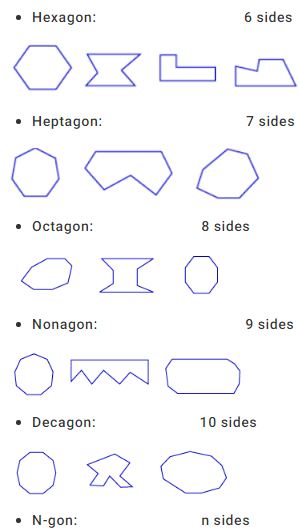
These shapes are polygons:
  • These shapes are not polygons:

Types of polygons based on the number of sides

  • Quadrilateral:             4 sides
  • Pentagon:                                     5 sides
  • Hexagon:                                     6 sides
Polygons with more than 10 sides are not usually given special names. A polygon with 11 sides is described as an 11-gon, a polygon with 12 sides as a 12-gon, and so on. Each of the polygons below is a 17-gon.
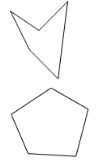
  • regular polygon is a convex polygon with all sides and angles congruent.
Convex pentagon              Concave pentagon
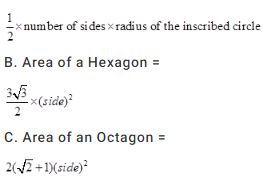
A. Area of a regular polygon =
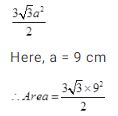
Example 1: Find the area of a regular hexagon whose side measures 9 cm.
Solution:
Area of a regular hexagon=
sq. cm = 210.4 sq. cm approx
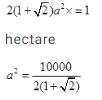
Example 2: Find the nearest metre the side of a regular octagonal enclosure whose area is 1 hectare.
Solution:
sq.m    or,
image021
2071 sq. approx..
a = 46 metres approx
  • The sum of the angles of a triangle is 180o. What is the sum of the angles of a quadrilateral?  Break polygon up into triangles to get formula:
Sum of angles = 180(n - 2)
  • What is the sum of the angles of a pentagon? = (540)
  •  What is the sum of the angles of a nonagon? = (1260)
  • If a pentagon is regular what is the measure of each interior angle?=  (108)


Reasoning Distance & Direction Shortcut Tricks

Distance & Direction Shortcut Tricks

As the name of the topic clearly explains that we deal with finding distance or direction in the questions of this topic. But for dealing with the questions from this topic, we must have very clear idea about two things.
  • Basic Directions
  • Pythagoras theorem
1. Basic Directions: We have 8 basic directions which should be crystal clear to us for attempting distance and direction questions.
One key point that should be kept in mind is that If not mentioned we always assume that the person is facing north.
2. Pythagoras theorem: According to this theorem,” The square of Hypotenuse is always equal to the sum of the squares of the other two sides of the right angle triangle”.
Suppose we have a triangle having base p, height q and hypotenuse r. Then according to this theorem:
p2+q2=r2
Now you have the basics required to atttempt Distance & Direction questions. So let us try to look at few questions on the same so that you will get to know the proper approach to solve these questions.

Some other basics:

1.B is to the east of A.
2. B is to the west of A.
3. B is to the north of A.
4. B is to the south of A.

5. B is to the North East of A.
6. B is to the North West of A.
7. B is to the South East of A.
c7
8. B is to the South West of A.
Direction: Ashok started walking towards South. After walking 50 meters he took a right turn and walked 30 meters. He then took a right turn and walked 100 meters. He then took a left turn and walked 30 meters and stopped. How far and in which direction was he from the starting point?
Solution:
Ashok started walking towards south.
After walking 50 meters...
..he took a right turn…
Some people have doubt in deciding left or right in direction questions; they can replace right by clockwise and left by anticlockwise. So now moving right (clockwise) from the tip of the arrow.
…and walked 30 meters.
He took a right turn…
…and walked 100 meters.
He took a left turn…
…and walked 30 meters.
Now for finding how far he has moved, we will check two things:
  • Horizontal displacement
  • Vertical displacement
Horizontal displacement = 30+30 = 60m
Vertical displacement = 100-50 = 50m
Final displacement = √(602+502) = √(3600+2500) = √6100 = 10√61 m
Now for finding the direction with reference to initial position, we will draw a line joining two points which will give us the direction.
We can clearly see that the direction in which Ashok moved is northwest.
So the final answer for this question will be “Ashok moved 10√61 meters in northwest direction”.
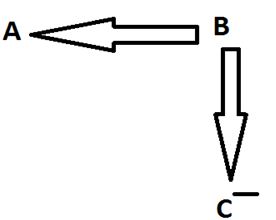
Directions: Jay starts his van from point X and covers a distance of 10 km towards west, then he turns north and covers a distance of 7 km. Again, he takes a right turn and covers 25 km. Now he covers 6 km, after taking a left turn. At last he takes a left turn and covers 15 km and stops at point Z.
Solution:
Jay starts his van from point X and covers a distance of 10 km towards west
then he turns north
and covers a distance of 7 km
Again, he takes a right turn
…and covers 25 km
Now he covers 6 km, after taking a left turn.
At last he takes a left turn…
…and covers 15 km and stops at point Z.
Q. Towards which direction was the van running before stopping at point Z?
  1. North
  2. East
  3. West
  4. South
  5. None of these
Solution: We can clearly see that van was running towards west before stopping at point Z.
So the correct answer is C.
Q. How far is Jay from point X?
  1. 23 km
  2. 25 km
  3. 17 km
  4. 50 km
  5. None of these
Soution:
Horizontal movement = 10-25+15 = 0 kms
Vertical movement = 7+6 = 13 km
So final movement = = √(02+132) = √169 = 13 km
Direction of movement is North.
Key points related to Distance & Direction:
  • Always remember the basic directions.
  • Pythagoras theorem is valid only for a right angle triangle.
  • Always approach the question step by step.
  • In the End, join the initial and final point to get to know the distance and relative direction.
  • If in any of the questions, the relative direction is given.i.e. P is to the north of Q, then you can use the basic directions to get the location of P and Q.


Reasoning Concept of Coding Decoding & its Important Shortcuts

Concept of Coding Decoding & its Important Shortcuts

Tips:

➀ Try to focus on the thinking behind the solution.

Example 1: If GLORIOUS is coded as GOLRIOSU, code ‘JUDICIAL’?
Solution: This doesn’t need any explanation. A simple question based on observation.
As G L O R I O U S is coded as G O L R I O S U, we are that second and third letters are interchanged, again last two letters are also interchanged as shown below.
Using the same logic, the word J U D I C I A L is coded as J D U I C I L A
Example 2: If PEN is written as ‘+X’ and ENT is written as ‘X–’ in a certain code, how is TEN written in the same code? 
Solution: The first thing to notice is that PEN has three characters while +X has only two. So two characters of PEN have been replaced by a single character. The same pattern can be seen in the case of ENT.
We must look for something common in the two of them PEN and ENT.
PEN = “+X”
ENT = “X–”
Common feature in both the above are EN & X. 
So P = +, EN = X & T = –
TEN = –X

   LETTER CODING:

Here letters are assigned codes according to a set pattern or rule concerning the movement or reordering / rearranging of letters and you need to detect this rule to decode a massage. Sometimes, specific codes are assigned to particular letters without any set pattern. Observe a few examples to know the various reordering or rearranging techniques.
Direction for example 3: In these questions the real alphabets in a word are replaced by certain other alphabets according to a specific rule to form its code.
Example 3: In a code language if TRAINS is coded as RTIASN, how PISTOL will be coded in the same language?
(a) SITLOP
(b) IPSTLO
(c) SIPTLO
(d) IPTSLO
Solution: If we compare the basic word {TRAINS} with the coded word {RTIASN}, we would see that the letters used in the word are same as in the basic word but their order of placement has been changed. Letter T at first position of the basic word has been placed at second position in the coded word and the letter R at the second position has been placed in the first position.
It means that in this question, letters of the basic word have been interchanged i.e. first letter with second, third with the fourth and so on. And thus we get the coded word. So PISTOL will be coded as IPTSLO. Hence option (d) is the answer.

➂ NUMBER CODING: 

Numerical code is given or value is assigned to a word. Here the only way to relate the alphabets & numbers is by associating the positions of the letters in the English alphabet. Sometimes any mathematical operation like addition or subtraction can be performed using the position of the letters. Direct coding questions can also be asked.
Direction for example 4: In this question, either numerical code values are assigned to a word or alphabetical code letters are assigned to the numbers.
Example 4: If PAINT is coded as 74128 and EXCEL is coded as 93596, then how would you encode ACCEPT?
(a) 455978
(b) 547978
(c) 554978
(d) 735961
Solution: In the given code the alphabets have been coded as follows:
P     A     I     N     T     E     X     C     L
7     4     1     2     8     9     3     5     6
So, in ACCEPT, A is coded as 4, C as 5, E as 9, P as 7 and T as 8. Hence the correct code is 455978 and therefore the answer is Choice (a).

➃ MIXED LETTER/NUMBER CODING: 

Some messages are given in the coded language and the code for a particular word or message is asked. To analyze such codes, any two messages bearing a common word are picked up. The common code number are picked up. Proceed in the similar fashion by picking up are possible combination of two, the entire message can be decoded.
Example 5: If ‘tee see pee’ means ‘drink fruit juice’; ‘see kee lee’ means ‘juice is sweet’ and ‘lee ree mee’ means ‘he is intelligent’, which word in that language means ‘swee’?
(a) see
(b) kee
(c) lee
(d) pee
Solution: In the first and second statement, the common word is ‘juice’ and the common code word is ‘see’. So, ‘see’ means ‘juice’.
In the second and third statements, the common word is ‘is’ and the common code is ‘lee’. So ‘lee’ means ‘is’. Thus in the second statement, the remaining word ‘sweet’ is coded as ‘kee’. Hence the answer is choice (b).
Example 6: In a certain code, ‘786’ means ‘study very hard’, ‘958’ means ‘hard work pays’ and ‘645’ means ‘study and work’. Which of the following is the code for ‘very’?
(a) 8
(b) 6
(c) 7
(d) Cannot be determined
Solution: Based on the same logic as used in the above question, the code for ‘very’ can be found out to be ‘7’, hence the answer is choice (c).

 ➄ Coding decoding questions can also be asked in following types, these types were recently asked in SBI Exam and it puzzled many students. But if you read the instructions carefully and practice it, you can easily solve it. 

Type: Symbols and Places of Digits
Example 6 : Triangle represents ∆ (1) and circle represents ○ (0). If triangle appears in unit's place then only its value is 0. If it appears in 10's place its value is 1 and when it appears in 100’s place is doubled to 2 like that it continues. Questions based on this
For example:
∆ ○ =0+0=0
∆○∆∆∆= 8+0+2+1+0=11
6.1. How will you represent ‘29’ in this code language?
(a) ∆∆∆○∆∆
(b) ○○∆∆∆○○
(c) ∆∆∆∆∆∆○
(d) ∆○∆○∆○∆
(e) ∆○∆∆○○ ○
Solution: (a)
∆∆∆○∆∆ = 16+8+4+0+1+0=29
6.2. What will be the code for  ○∆○∆○∆○ ?
(a) 12
(b)74
(c)21
(d)16
(e)4
Solution: (c)
○∆○∆○∆○ = 0+16+0+4+0+1+0=21
Type : (Tabular) Coding based on Conditions
Example 7: In each question below is given a group of numbers separated by comma (,). They are followed by four combinations of letters/symbols numbered (1), (2), (3) and (4). You have to find out which of the given combinations correctly represents the group of numbers based on the following coding system and mark the new code of that combination as the answer. If no condition is applicable coding will be according to the table.  If none of the four combinations correctly represents the group of numbers, mark ‘None of the above’, as the answer.

Conditions:
1) If the first number is a prime and the last number is a composite number then their codes are to be interchanged. 
2) If both the first and the last number is Prime both are to be coded as $.
3) If both the first and the last letters are Composite and in between there are two
or more Prime numbers then Prime numbers are to be coded as A.
4) If the first number is composite and the last number is a prime number, both are to be coded as the code for the composite number.
7.1.  4, 17, 88, 16, 3
(a) #,K,&,$,#
(b) A,K,&,$,#
(c) A,K,&,$,A
(d) $,K,&,$,$
(e) None of the above.
Solution: (a)
In 4,17,88,16,3 the first number is a composite and last is a prime; so codes will be according to condition (4).
7.2.  44, 11, 4, 2, 8
(a) $,S,#,C,$
(b) A, S,#,C,A
(c) B, S,#,C,@
(d) @,S,#,C,B
(e) None of the above
Solution: (d)
Given set of numbers are 44,11,4,2,8, here both first and last numbers are composite and there is only one prime number in between them. Hence no condition will apply and the codes are according to the given symbol table.


Reasoning Blood Relation Tips and Trick We always use + sign for male.

Blood Relation Tips and Trick

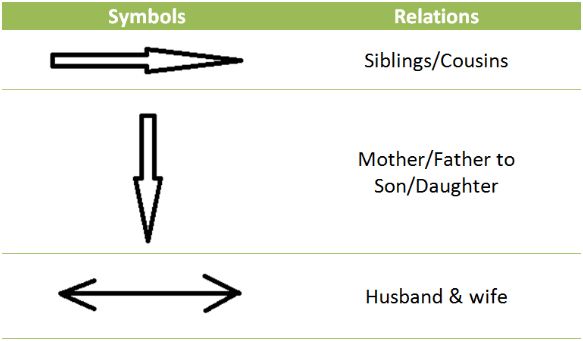
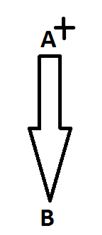
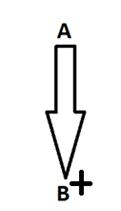
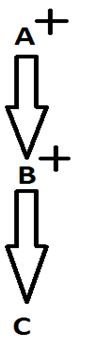
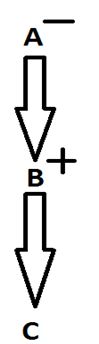
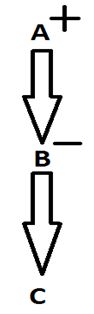
We always use + sign for male.
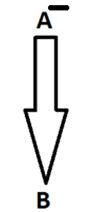
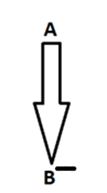
We always use – sign for female.
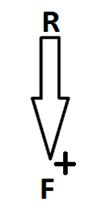
  • To show the relation from one generation to another (Mother/Father to Son/Daughter), we use single arrow head.
  • To show the relation within the same generation (siblings/cousins), we use single arrow head.
  • To show the relation between husband & wife, we use double arrow head.
Let us see symbolic representation of various blood relations:
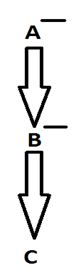
1. A is the father of B: Here we know the gender of A only. B can either be son or daughter.
2. A is the mother of B: Here we know the gender of A only. B can either be son or daughter.
3. B is the son of A: Here we know the gender of B only. A can either be father or mother.
4. B is the daughter of A: Here we know the gender of B only. A can either be father or mother.
5. B is the wife of A: Here we know the gender of both A and B.
6. A is the husband of B: Here we know the gender of both A and B.
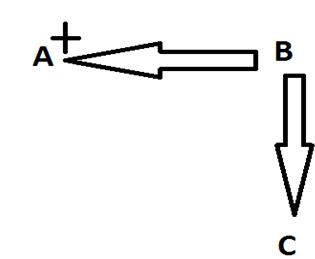
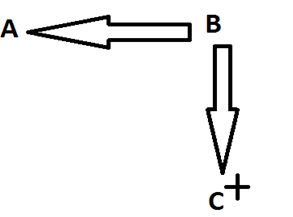
7. A is the uncle of C: Here we know the gender of A only. B & C can be either male or female.
8. A is the aunt of C: Here we know the gender of A only. B & C can be either male or female.
9. C is the nephew of A: Here we know the gender of C only. A & B can be either male or female.
10. C is the niece of A: Here we know the gender of C only. A & B can be either male or female.
11. A is the paternal grand-father of C: Here we know the gender of A and B both.
12. A is the paternal grandmother of C: Here we know the gender of A and B both.
13. A is the maternal grandfather of C: Here we know the gender of A and B both.
14. A is the maternal grandmother of C: Here we know the gender of A and B both.
Blood relation questions can be asked in two different ways.

Type I: In this case, the blood relation is not coded.

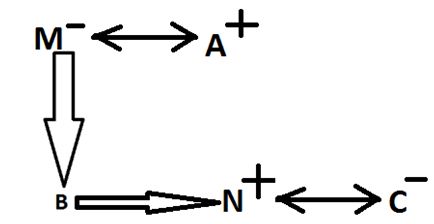
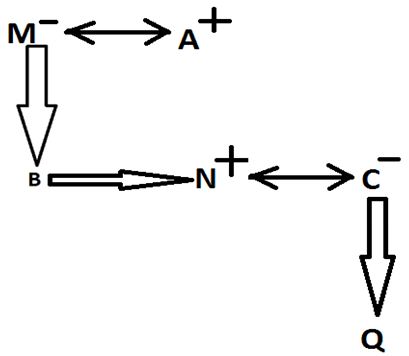
Direction: M is the mother of B. A is the husband of M. N is the only brother of B. C is married to N. Q is the only child of C. N does not have any sister. J is the father of A.

Solution:
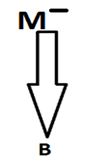
M is the mother of B.
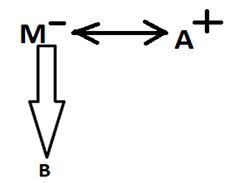
A is the husband of M.
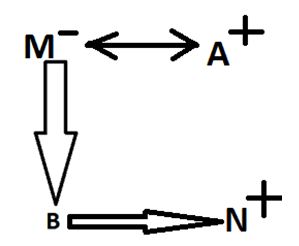
N is the only brother of B.
C is married to N.
Q is the only child of C.
N does not have any sister (Which means B is definitely his brother).
J is the father of A.
Q.1) If A doesn’t have any grandson, then how is Q related to B?
  1. Can’t be determined
  2. Sister-in-law
  3. Daughter-in-law
  4. Niece
  5. Nephew
Solution: We can see that Q is either the grandson or granddaughter of A. But as per the question, A doesn’t have any grandson which definitely assures that Q is A’s granddaughter. So Q is B’s niece.
Q.2) How is A related to C?
  1. Uncle
  2. Can’t be determined
  3. Father-in-law
  4. Nephew
  5. Brother-in-law
Solution: A is N’s father and C is N’s wife. So A is the father-in-law of C.
Q.3) How is B related to J?
  1. Father
  2. Nephew
  3. Brother-in-law
  4. Brother
  5. Grandson
Solution: B is the son of J’s son. So B is the grandson of J.

Type II: In this case, the blood relation is coded.

Directions: Read the following information carefully and answer the question which follows:
‘A*B’ means A is the son of B.
‘A+B’ means A is the father of B.
‘A>B’ means A is the daughter of B.
‘A<B’ means A is the wife of B.
Q.4) What will come in place of the question mark (?), if it is provided that M is the grandmother of F in the expression ‘F*R<S?M’?
  1. >
  2. <
  3. +
  4. *
  5. Can’t be determined
Solution: F*R means F is the son of R.
R<S means R is the wife of S.
M is the grandmother of F (given already) which means M is either mother of S or R. So we can’t determine the answer for this questions using given options. So the answer is 5.
So we have seen two different ways in which blood relation questions can be asked. Sometimes blood relation concept is used in sitting arrangements as well to make those questions more tough. That application of blood relations will be discussed in basics of sitting arrangement.

Key points related to blood relations:

  • Never assume any person to be male or female if not specified in the question.
  • Step by step approach can always give the solution for blood relation questions, doesn't matter the question is coded or simple one.